
Google-Indexed Comment Backlink Sites You Can Use
Download and explore a curated list of high-authority platforms where Google actively indexes comment pages. These sites support nofollow/UGC comment backlinks that help diversify your link profile, drive real referral traffic, and strengthen brand exposure.
A large, community-driven discussion platform with niche-specific subreddits. Comment sections are active, frequently indexed by Google, and ideal for natural UGC-style comment backlinks.
A well-known technology media site featuring digital products, reviews, and industry insights. Article pages often support comments, making it suitable for contextual comment backlinks.
A business-oriented content site where certain blog pages allow user comments. Suitable for creating natural UGC backlinks and basic brand exposure.
Free SEO Link Building & Backlink Management
BacklinkHelper is a free Chrome extension that streamlines your link building workflow. Autofill forms, generate natural comments, track backlinks, and manage your SEO campaigns - all with one-click simplicity.
Smart Form Autofill
Instantly detect and prefill directory submissions, guest post forms, and backlink requests with your site data. Save hours of manual typing with one-click automation.
AI Comment Generation
Create unique, contextually relevant comments for each submission by analyzing both your content and target pages. Generate natural, readable text that passes manual review.
Backlink Portfolio Management
Track, organize, and monitor your entire backlink portfolio. Prevent duplicates, add custom notes, group by campaigns, and get periodic status checks on link health.
Multi-Site SEO Management
Store and switch between multiple websites with their own SEO titles, descriptions, and keywords. Ideal when managing several sites or client projects.
Smart Blacklist Management
Manually blacklist low-quality or inactive sites and automatically skip them in future submissions. Build your quality filter over time to focus only on valuable opportunities.
Local Data Security
All your data stays on your device. Store account credentials, campaign notes, and backlink history securely without cloud dependency or privacy concerns.
How to Use BacklinkHelper
Getting started with BacklinkHelper is easy. In just a few steps, you can speed up your link-building process and streamline SEO submissions.
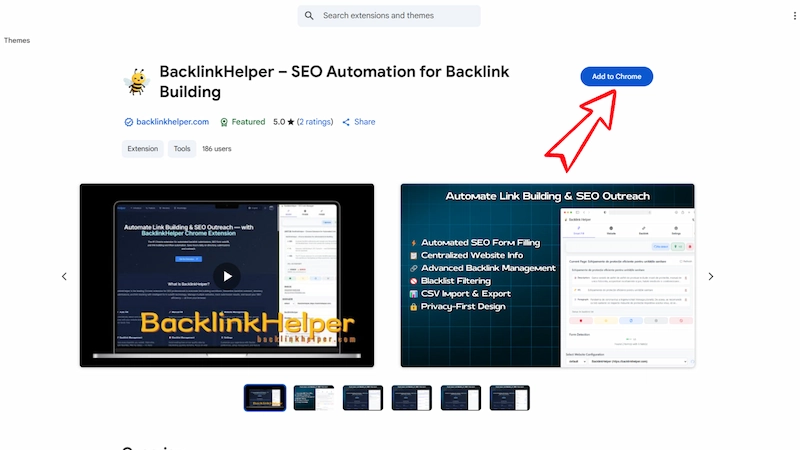
Step 1: Install the Extension
Install the Extension from Chrome Web Store.
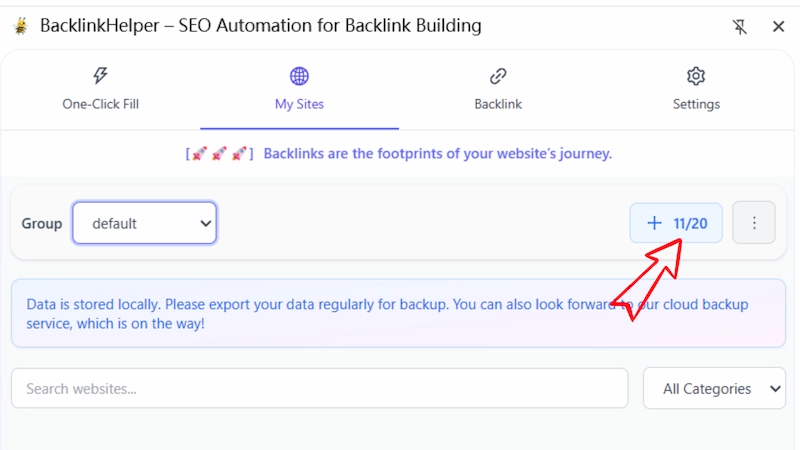
Step 2: Add Website Info
Add your website info — title, URL, description, email, and keywords.
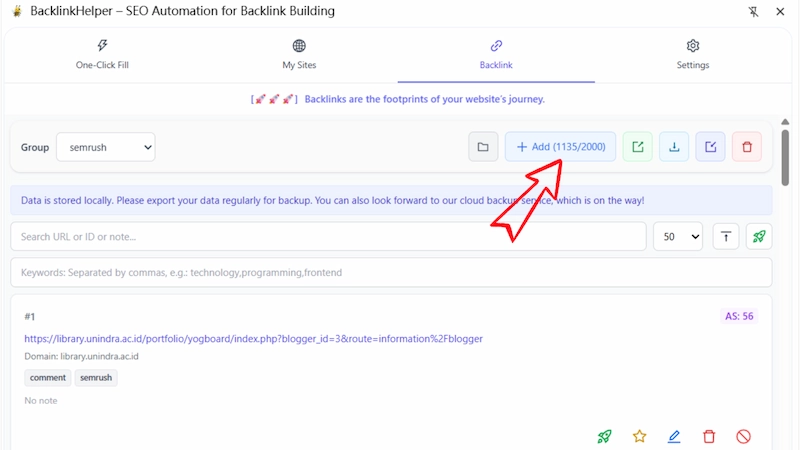
Step 3: Add Backlink Targets
Add or import your backlink submission targets (URLs/domains).
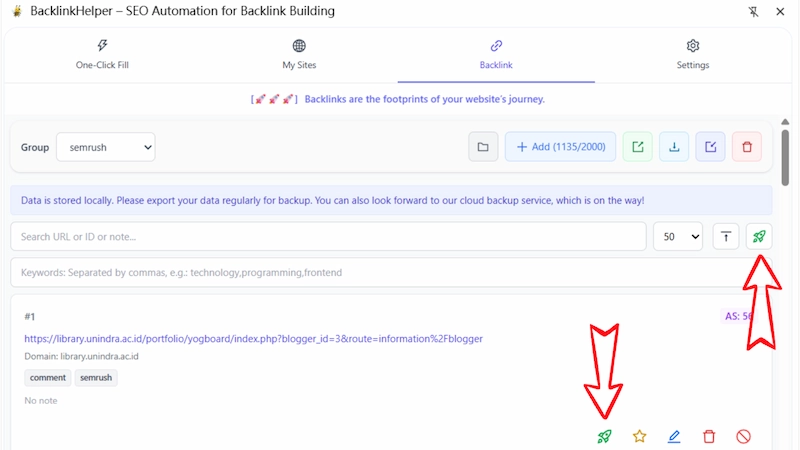
Step 4: Launch
Select one or more backlinks and click 'Launch' icon.
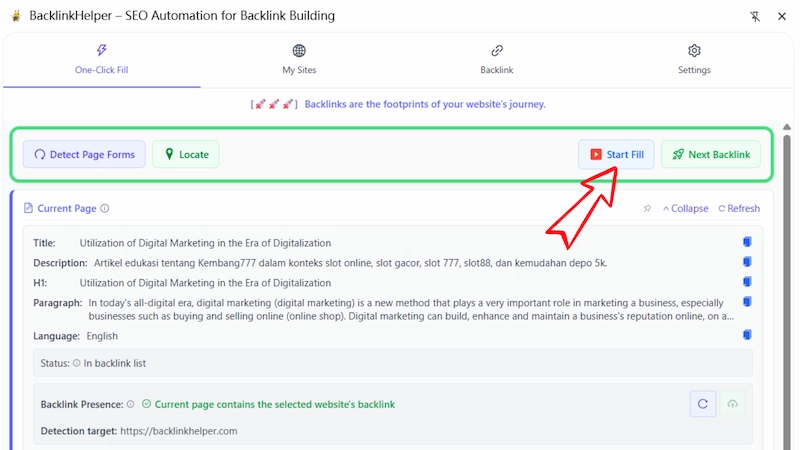
Step 5: Fill Forms
Click 'Start Fill' or use the manual fill option to complete the form.
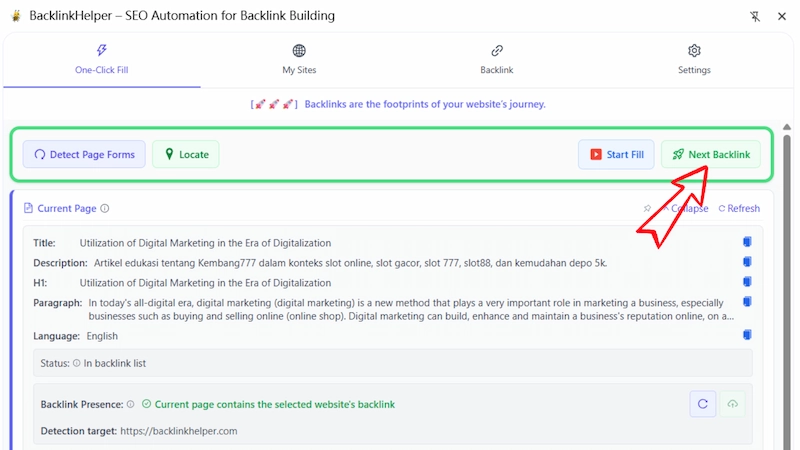
Step 6: Next Backlink
Click 'Next Backlink' to continue submitting the next one.
Perfect for SEO Professionals & Digital Marketers
From enterprise SEO teams to solo freelancers, BacklinkHelper scales with your link‑building needs. Streamline outreach workflows and improve day‑to‑day efficiency.
SEO Agencies & Consultants
Scale your link building operations with assisted directory submissions, client campaign management, and organized outreach tracking. Perfect for managing multiple client portfolios.
Web Admins & Site Owners
Maintain a clean record of where your website is submitted, and avoid duplicate entries or spammy listings.
Digital Marketing Teams
Distribute content, track submission outcomes, and manage client sites with centralized controls and easy export tools.
Freelancers & Solo Entrepreneurs
Maximize your SEO impact with minimal effort — no team or budget needed to manage your backlink profile.
Flexible Credit Packs for Your SEO Needs
Use credits to automatically generate comments that match your target anchor texts and fit the context of each site. Save time while building high-quality backlinks that feel natural and enhance your SEO efforts.
Starter Pack
Perfect for new users or occasional comment generation needs. Start small and experience the power of assistive SEO.
Includes
- 250 credits
- Generate up to 250 comment drafts
- Credits valid for 1 year
- Standard support

Pro Pack
Ideal for SEO freelancers and website owners looking to scale up. Unlock more credits for larger link-building campaigns.
Includes
- 550 credits
- Generate up to 550 comment drafts
- Credits valid for 1 year
- Standard support
Profession Pack
For power users with high-volume backlink needs. Get the best value and priority support with this pack.
Includes
- 1800 credits
- Generate up to 1800 comment drafts
- Credits valid for 1 year
- Priority support
What SEO Pros Say About BacklinkHelper
From SEO freelancers to digital marketing teams, users love how BacklinkHelper saves time and keeps their backlink outreach organized.
“It's pretty good, efficiency is definitely higher than before.”
Frequently Asked Questions About BacklinkHelper
Need help? Here are answers to common questions. You can also contact us via email if you need further support.
Does BacklinkHelper support all websites?
The extension works on most standard HTML forms. However, some websites with dynamic JavaScript forms may require manual filling.
What if the smart autofill doesn't detect the form?
Try refreshing the page and clicking 'Rescan'. If the form still isn’t detected, use manual fill instead — it works on almost all fields.
Is my data safe? Where is it stored?
Yes. All your data is stored locally in your browser and never sent to any server. You can export backups anytime.
Can I use this on multiple websites?
Yes. The plugin can automatically detect the backlink submission status of the current page and display it, helping you track and manage links efficiently.
How do I avoid submitting to the same site twice?
If tracking is enabled, BacklinkHelper can record your submitted links and notify you when you try to submit the same URL again to avoid duplication.
Does it work on Mac and Windows?
Yes! As long as you’re using Chrome, BacklinkHelper works on both platforms with full functionality.
Is there a limit to how many backlinks I can track?
The extension supports tracking up to 1,000 backlinks. We recommend regular clean-up for optimal performance.
Can I import/export data?
Yes. You can bulk import/export site info, backlinks, and blacklists in CSV format anytime.
Streamline Your Link Building with Assistive Tools
Join SEO professionals using the BacklinkHelper Chrome extension to streamline directory submissions and manage link‑building efficiently. Get started free today.